Why This Exists
Hackers Are "Trying the Door Handles" on Every WordPress Site — Including Yours
Think nobody cares about your small website? Think again. The moment a new WordPress site goes live, automated scripts start probing it. They don't care who you are or what you sell. They just want a foothold.
It's like a thief walking down a street at 3 AM, quietly pulling on every single car door handle. Most are locked. They keep walking. But if they find one that clicks open, they’re inside. Your site is facing these silent checks every single day, completely out of sight.
Is Someone Trying to Break Into Your WordPress Site Right Now? Here's How to See It (Free)
You don't need a massive IT budget to find out who is poking around your site. In fact, you can see it happen without spending a penny.
Most people assume their site is safe because it looks fine on the outside. But by looking at your raw traffic access logs—or using a simple, unbloated tracking tool—you can watch these automated bots flag down your login page in real time. If you see dozens of failed login attempts for usernames like "admin" or "test," someone (or rather, a script) is actively trying to guess your way in.
Why Random Strangers Are Trying to Guess Your WordPress Password (And How to See It Happening)
It feels personal, but it isn’t. These aren't hackers sitting in dark rooms guessing your specific pet's name. They are massive networks of compromised computers running automated software.
Why do they want your password? Simple. A compromised WordPress site is valuable. They can use your server to send out millions of spam emails, host hidden phishing pages, or redirect your hard-earned traffic to dodgy retail sites. To see it happening, you just need a dashboard that surfaces failed login attempts. When you see twenty attempts from twenty different countries in five minutes, you realize how relentless the web really is.
The Difference Between Real Visitors and "Bad Bots" Crawling Your WordPress Site
Not all automated traffic is evil. Google needs to crawl your pages to index them, and Pinterest needs to read your images to display your pins. These are your good bots.
Bad bots have a entirely different agenda. They skip your content pages and head straight for the vulnerabilities. They scour your files looking for outdated plugins, exposed configuration files, or open doorways. Telling them apart is simple if you look at their target destinations: a human or a good bot wants to read your latest article; a bad bot wants to find a file that shouldn't be there.
Your WordPress Site Looks Quiet — But Is It Actually Being Targeted? Here's How to Find Out
You open your site, it loads quickly, and the front page looks perfect. Everything seems calm.
But underneath the hood, the story is usually very different. Automated probes don't break your layout or leave a mess until they actually succeed. To find out if you are a target, you have to look where the cameras are pointing. Checking your site's access records will show you the thousands of background requests that never show up in your standard Google Analytics reports.
Where Do WordPress Hack Attempts Actually Come From? Real Data, Explained Simply
If you look at the raw IP addresses attacking your site, you might see locations spanning from Russia and China to data centers right in the US or Europe.
But tracing the physical location doesn't tell the whole story. Most attacks launch from hijacked servers, home routers, or smart devices that have been infected elsewhere. A script running out of a routine cloud hosting account in Virginia can target a small business blog in Southport without the owner of that cloud account ever knowing. It’s a global network of automated white noise.
Free WordPress Security Plugins Compared: Lightweight Monitoring vs All-in-One Suites
When people get worried about security, they usually rush to install the biggest, heaviest security plugin they can find. These all-in-one suites do everything: firewalling, file scanning, country blocking, and database optimization.
But they also load massive amounts of code onto every single page visit, slowing your site down for actual human users. On the flip side, lightweight monitoring plugins take a different approach. They don't try to rewrite your whole site structure; they simply keep watch, log the activity, and show you exactly what's happening without dragging your page speeds down into the mud.
Why "Lightweight" Matters More Than "Feature-Packed" for Your WordPress Security Plugin
A slow website kills your user experience and hurts your rankings. If your security plugin is so heavy that it takes an extra second for your pages to load, it's actively costing you business.
You don't need a plugin that promises fifty different features you will never configure or understand. You need a tool that does one thing incredibly well: absolute visibility. When a plugin is lightweight, it runs quietly in the background, keeping your site fast and nimble while still giving you the data you need to stay safe.
What Is XML-RPC and Why Do Bots Keep Attacking It on WordPress Sites?
If you look at your site logs, you will likely see hundreds of requests hitting a file called
xmlrpc.php
.
This is an old WordPress feature designed to let external apps (like the WordPress mobile app or remote blogging tools) talk to your site. Because it allows a user to try hundreds of password combinations in a single request, bots absolutely love it. It’s one of the most common backdoors they try to abuse, and simply monitoring or disabling access to this single file can eliminate a massive percentage of your daily background noise.
A WordPress Security Dashboard Even Beginners Can Understand — No Tech Jargon
You shouldn't need a degree in cybersecurity to see if your website is safe. Most security tools bombard you with complex acronyms, scary looking graphs, and warnings about things that don't matter to a small business owner.
True security design focuses on clarity. A clean dashboard should tell you three basic things at a glance: who tried to log in, what files they were looking for, and whether your front door is shut tight. No confusing jargon, just straight facts about your traffic.
Real Example: How Many Hack Attempts Hit a Small WordPress Blog in One Week
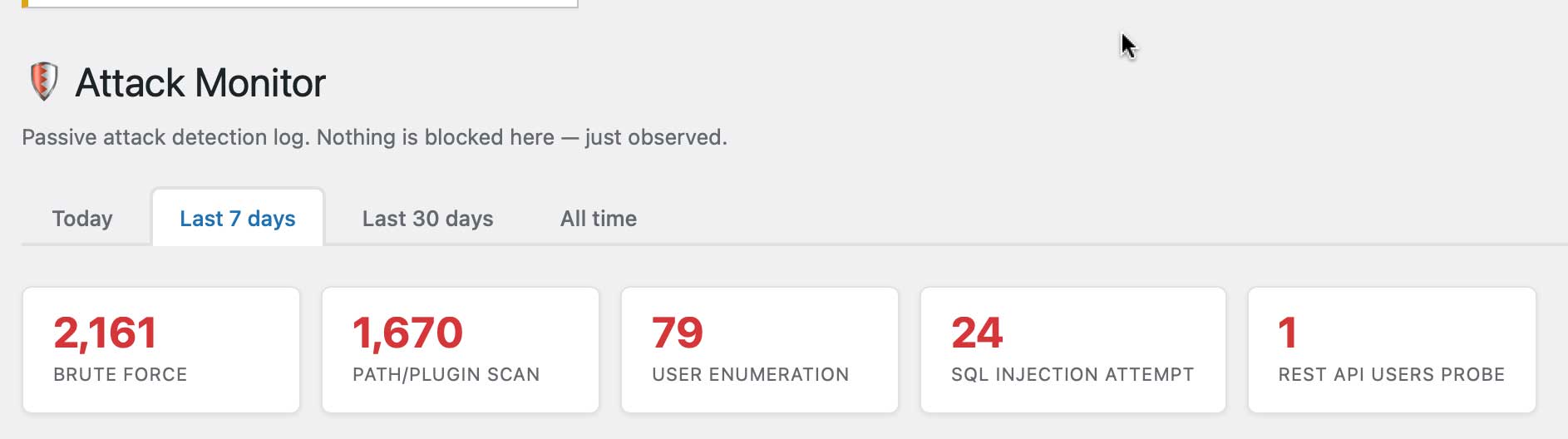
Let’s look at actual numbers. A brand-new, low-traffic blog with fewer than fifty human visitors a day was fitted with a basic monitor.
The results after seven days? 2,161 automated attempts to access the login page, and more than 1,650 malicious probes looking for common plugin flaws. The owner had no idea because the site never crashed. It shows that no site is too small to be noticed by a botnet scanner.
Should Your WordPress Security Plugin Block Attacks or Just Show You Them? Here's the Difference
Many plugins try to build a massive wall, actively blocking IPs and locking out users. The problem? They often lock out the site owner by mistake, or block legitimate customers who simply forgot their password.
A monitoring plugin operates differently. It shows you the activity without interfering with the server's natural behavior. By seeing the attacks clearly, you can make smart decisions—like changing a weak username or moving your login URL—rather than trusting a clumsy automated system to play bouncer for you.
What Small Business Owners Say After Installing a Free WordPress Security Monitor
"I thought my site was invisible because I'm a local business," is the most common feedback.
Once owners get a clear look at their site's actual traffic logs, the reaction is almost always surprise. They realize that the internet isn't a passive billboard; it's an active environment. Seeing the numbers firsthand usually gives them the exact push they need to use stronger passwords and take basic site maintenance seriously.
Free WordPress Plugin: See Every Hack Attempt and Bot Visit on Your Site in Real Time
If you want to pull back the curtain and see exactly what is hitting your site this very second, you can do it right now.
By using a targeted, lightweight monitoring tool, you gain total visibility over your WordPress backend. Stop guessing whether your site is safe or wondering if anyone is out there in the dark. Plug in a simple monitor, watch the real-time log, and take control of your site's security today.